

Steering the agent
Sometimes the agent needs a nudge, a stop, or a person to take over. This page covers pausing, interrupting, cancelling a run, taking over the task's branch on your own machine, and handing it back.
Steering is for the task's owner, the space's maintainers and workspace admins. Everyone else on the task can still post context for the agent's next turn.
Pause and carry on
While the agent is working, choose Pause the agent. Its current work stops, and anything people ask waits. The card on the task says the agent is paused and which agent and step will carry on.
Choose Let it carry on to resume. Only the work the task was on last resumes; other agents that worked on the task stay quiet.
Interrupt with a new instruction
To change direction while the agent is working, write your message and choose Send now and interrupt. The agent's current turn stops and it starts again with your message.
Send after this turn leaves the current turn running; your message is read when the turn finishes.
Cancel a run
Cancel run on a running turn stops that run. Members and admins have it. The thread records who cancelled it. Anything the agent had already written, such as part of the plan, is kept.
Take over
When the agent has a branch for the task, you can work on it yourself. Tasks in a Files space have no branch, so there's nothing to take over.
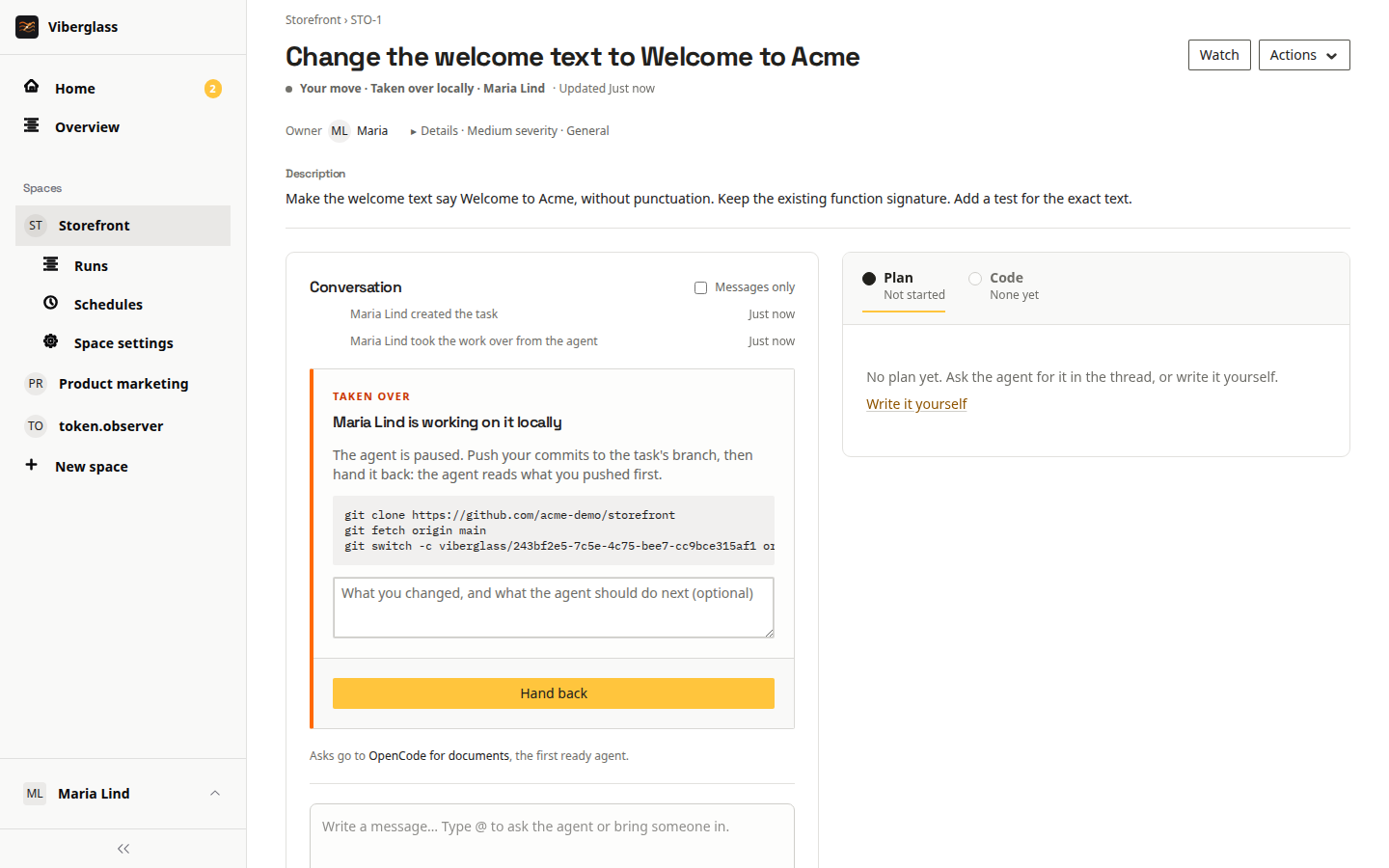
- Choose Take over. The agent is paused, and the task shows who has the work.
- The Taken over card shows the commands to get the branch, such as
git clone,git fetchandgit switch. If the agent hasn't pushed the branch yet, the commands start it from the base branch. - Work on the branch, run your checks, and push the commits you want the agent to see.
- Optionally write a note for the agent: what you changed and what it should do next.
- Choose Hand back. The agent carries on from your commits, reading what you pushed first.
The viberglass command
If you already have a clone of the repository, the viberglass checkout command puts the task's branch in it. Install it with npm (it needs Node.js 20 or later):
npm install -g viberglass
export VIBERGLASS_URL=https://viberglass.example.com
export VIBERGLASS_TOKEN=<an API token from Settings → API tokens>
viberglass checkout WEB-42
It checks that your clone's origin is the task's repository, fetches the branch and switches to it.
When a run fails
A failed turn shows a card with what went wrong, who can fix it, and what to do next.
- For most failures, Try again with the same agent is offered. Adding detail to the task's description often helps.
- If the setup is the problem, such as a rejected model key or missing repository access, trying again would fail the same way. The task is paused until an admin fixes the setup. The card links to the agent's settings for admins, and admins can retry every task the same problem paused at once.
See Troubleshooting for admins' side of failures.