Chrome extension
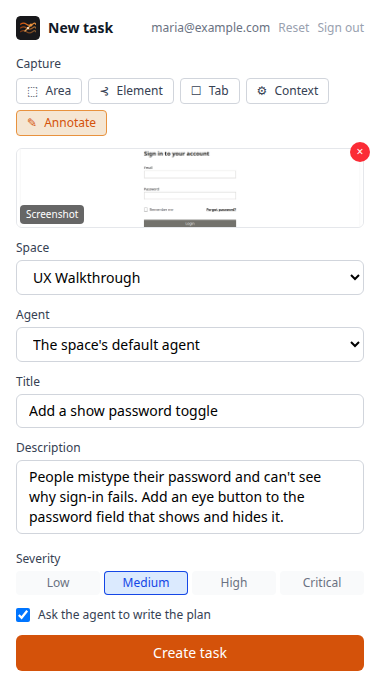
The Chrome extension creates a task from the page you're on, with a screenshot, an annotated area or element, a screen recording, and the page's console and network errors attached. It can ask an agent to write the plan straight away.
Install it
The extension isn't in the Chrome Web Store; you load it unpacked.
- Download
viberglass-chrome-extension-<version>.zipfrom the latest release and unzip it. To build it yourself instead, runnpm installandnpm run build -w @viberglass/chrome-extensionin the Viberglass repository; the extension is inapps/chrome-extension/dist. - Open
chrome://extensionsand turn on Developer mode. - Choose Load unpacked and pick the unzipped folder, or
apps/chrome-extension/dist.
Chrome keeps an unpacked extension until you remove it. To update it, replace the folder's contents with the new version and choose the reload button on the extension's card.
In the extension's settings, enter your workspace's address and its API address. On a Docker install these are http://localhost:3000 and http://localhost:8888. On Kubernetes and most other installs, both are your workspace's address. Then sign in with your Viberglass email and password.
Create a task
- On the page you want to talk about, open the extension.
- Capture what shows it: the visible tab, a selected area, or a clicked element. You can annotate the screenshot, or record the screen.
- Collect the page's console errors, network errors and details if they help.
- Pick the space, write a title and description, and set the severity.
- Leave Ask the agent to write the plan on to have the agent start on the plan as soon as the task exists. When the workspace has more than one agent you can pick which one; otherwise the space's default agent writes it.
- Create the task. The extension links to it in Viberglass.