

Install with Docker
The quickest way to try Viberglass: one command on one machine, then a short setup in the browser. Agents run as Docker containers on the same machine.
There are two ways to run it with Docker. The first, below, is for trying Viberglass on your own machine: it uses fixed database and encryption keys and only listens on that machine. For an installation your team shares on one server, use the production setup. For a cluster or the cloud, use Kubernetes or AWS.
Requirements
- Git.
- Docker Engine 20.10 or newer, with Docker Compose v2. On macOS and Windows, install Docker Desktop. On Linux, install Docker Engine and add your user to the
dockergroup (Linux post-installation steps), then sign out and back in. - Free ports 3000 (the app), 8890 (artifact previews), and 9000 and 9001 (object storage). See Ports to use others.
- A model key from an AI provider, or the address of a compatible model endpoint.
- A GitHub repository, and a fine-grained access token for it. Not needed if your first space is a Files space.
Start it
git clone https://github.com/Ilities/viberglass.git
cd viberglass
docker compose up -d
This downloads the published backend and frontend images and starts them with PostgreSQL and MinIO. Nothing is built. The backend runs its database migrations on startup. When it's up, open http://localhost:3000. docker compose logs -f backend shows what it's doing.
First-run setup
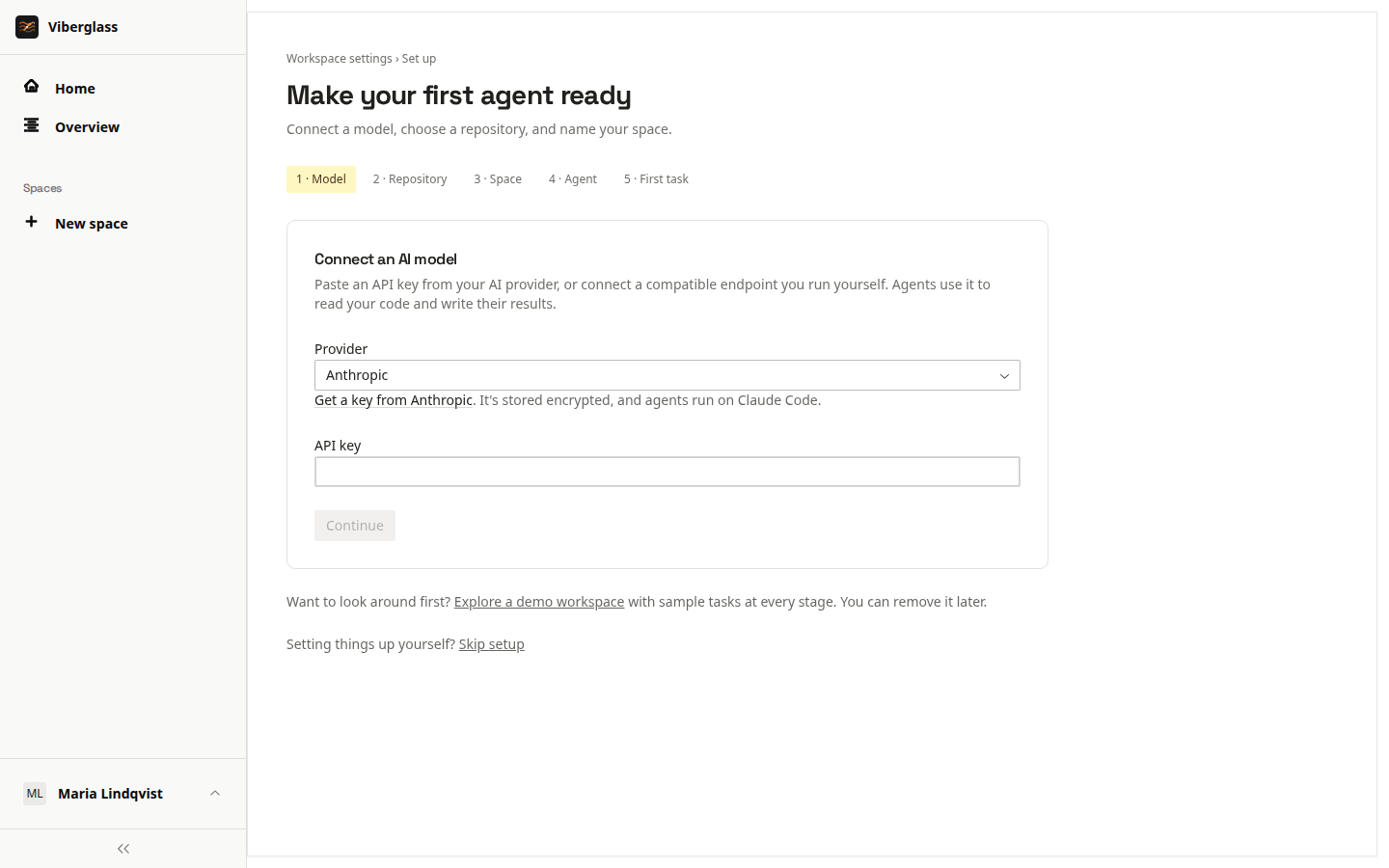
The first visit asks you to create the administrator account: your name, email and password. Setup then walks through the rest.
- Connect an AI model. Pick the provider that issued your key and paste it; setup checks it with the provider. Or choose Custom endpoint for a provider such as z.ai or a model you run yourself: enter the API base URL, the API it speaks, the endpoint's key and a model (Find models lists them). See Agents and models.
- Choose your space backing. Git repository is for code: enter the GitHub repository and an access token. "Create a token with the right permissions" opens GitHub's fine-grained token form with what the agent needs filled in: write access to Contents and Pull requests. Setup checks the token with GitHub. Files is for documents, presentations and other artifacts, and needs no repository. A space's backing can't be changed later.
- Name your first space.
- Getting your agent ready. Setup creates a default agent for your key and starts it on Docker. The first time, this downloads the agent's image and takes a couple of minutes.
- Try your first task. Setup suggests a starter task: in a repository it only reads your code and answers in the task, and in a Files space the agent writes a one-page brief. Choose Start the task to run it.
To look around before connecting anything, choose Explore a demo workspace on setup's first screen. It loads a sample space with tasks in different states. Its tasks don't run agents. Remove demo, in the demo's banner, deletes exactly what it added.
Worker images
Agents run in worker images pulled from ghcr.io/ilities, one per coding agent, tagged latest unless you set VIBERATOR_WORKER_IMAGE_TAG. To use images you built yourself, set VIBERATOR_WORKER_REGISTRY to empty in a .env file in the repository root, and restart the backend.
Agent containers join the viberglass-workers Docker network, where they reach the backend and object storage. The database isn't on that network.
Files spaces and previews
MinIO is the object storage, so Files spaces work without further setup. Its bucket lives in the viberglass-local_storage-data volume, and its console is at http://localhost:9001 (sign in as viberglass / viberglass-local). Task media and plan documents are kept there too. HTML, image and PDF artifacts preview from http://127.0.0.1:8890, a different host from the app's localhost, so the app's cookies never reach them.
Ports
Set these in a .env file in the repository root, then run docker compose up -d:
VIBERGLASS_HTTP_PORT: the app (default 3000).VIBERGLASS_PREVIEW_PORT: artifact previews (default 8890).VIBERGLASS_STORAGE_PORTandVIBERGLASS_STORAGE_CONSOLE_PORT: MinIO and its console (default 9000 and 9001).
Every port is bound to 127.0.0.1, so other machines can't reach them.
Optional services
Optional settings go in a .env file in the repository root. Apply them with docker compose up -d.
- Email: Mailpit catches mail locally. Set
EMAIL_FROMandSMTP_URL=smtp://mailpit:1025, then start it withdocker compose --profile mail up -d. Its inbox is at http://localhost:8025. For real delivery, pointSMTP_URLat your SMTP server. - Slack: set it up under Settings → Connections → Slack; it needs no settings here. Slack needs to reach the backend over HTTPS, so locally you need a tunnel such as
ngrok http 3000. See Repositories and integrations. - Traces: set
OTEL_EXPORTER_OTLP_ENDPOINTto an OTLP collector. See Telemetry.
Stop, start and upgrade
docker compose down stops everything; your data stays in Docker volumes and in ~/.viberglass (VIBERGLASS_DATA_DIR). docker compose up -d starts it again. To upgrade, run docker compose pull, then docker compose up -d. See Upgrades and backups.
On a server
docker-compose.prod.yml runs Viberglass on one Linux server from the published images: PostgreSQL, the backend, the frontend and, optionally, Caddy for HTTPS. Nothing is built on the server, and the passwords and keys come from a .env file.
You need:
- A Linux server with Docker Engine 20.10 or newer and Docker Compose v2, and about 20 GB of free disk for agent images.
- A domain name pointing at the server, with ports 80 and 443 open, for HTTPS. Sign-in cookies only work over HTTPS.
- A second hostname pointing at the server for artifact previews, such as
preview.viberglass.example.com. Optional; without it, HTML, image and PDF artifacts can only be downloaded. - An S3-compatible bucket, if you want Files spaces. Optional; spaces backed by a Git repository don't need one.
- A model key, and a GitHub repository with an access token, as above.
git clone https://github.com/Ilities/viberglass.git
cd viberglass
git checkout v1.0.0   # the release you want to run
cp .env.production.example .env
Fill in .env:
VIBERGLASS_URL: the HTTPS address people open, such ashttps://viberglass.example.com.VIBERGLASS_DOMAIN: the same domain withouthttps://, for the certificate.DB_PASSWORD,SECRETS_ENCRYPTION_KEYandWEBHOOK_SECRET_ENCRYPTION_KEY: generate each withopenssl rand -hex 32. Keep a copy of the two keys somewhere safe. Without them, the credentials Viberglass stores can't be read.VIBERGLASS_VERSION: the same release tag, so the images match.latestfollows the main branch.VIBERGLASS_PREVIEW_URLandVIBERGLASS_PREVIEW_DOMAIN: the preview host's HTTPS address and its domain. Leave both empty to turn previews off.
Then start it with HTTPS:
docker compose -f docker-compose.prod.yml --profile https up -d
Caddy gets a Let's Encrypt certificate for each domain on its first request. Open your address and go through first-run setup. The backend runs the database migrations each time it starts.
If you already have a reverse proxy, leave out --profile https and point the proxy at 127.0.0.1:8080, the frontend. It serves the app and passes /api to the backend. Send the preview host to 127.0.0.1:8890 (VIBERGLASS_PREVIEW_PORT), with HTTPS as well.
Artifact previews run the agent's HTML and scripts, so they load from a host of their own, where the app's sign-in cookies never go. Use a hostname that isn't the app's, such as a sibling subdomain or another domain. The app only sets cookies for its own host, so a subdomain of the app's domain is fine. Preview links are signed with SECRETS_ENCRYPTION_KEY, or with PREVIEW_SIGNING_KEY when you set one, and work for an hour.
Files spaces keep their files and artifacts in object storage. Set the S3_* settings in .env to a bucket that already exists; .env.production.example describes each. Agents running in containers on the server fetch and save files through signed URLs for S3_WORKER_ENDPOINT, or S3_ENDPOINT when it's unset, so it has to be an address they reach from the Docker bridge network. A bucket also moves task media and plan documents to it, and browsers download media from S3_PUBLIC_ENDPOINT.
What else to know:
- Agents run as containers on the same server. The backend starts them through the Docker socket, so treat access to the backend container as root access to the server.
- Agent containers call the backend back on the Docker bridge address,
172.17.0.1:8888, which isn't reachable from outside the server. Ifip addr show docker0shows another address, setVIBERGLASS_WORKER_API_BINDin.env. - Task media, saved agent sessions, instruction files and skills are kept in
/var/lib/viberglass(VIBERGLASS_DATA_DIR), and the database in theviberglass_postgres-datavolume. Back up both, and.env. With a bucket set, task media and plan documents are kept in it instead, alongside the Files spaces, so back it up too. - Optional email and trace settings are in
.env.production.example.
To upgrade, set VIBERGLASS_VERSION to the new release in .env, then run docker compose -f docker-compose.prod.yml --profile https pull and docker compose -f docker-compose.prod.yml --profile https up -d. Back up the database first; see Upgrades and backups.